Most organizations stall on AI not because they lack tools, but because their org design gets in the way, rendering human-AI collaboration inefficient. They pilot copilots, open sandboxes, celebrate demos, but then, progress flattens. Why? Work is split into silos: product in one lane, data in another, ops and risk somewhere else. However, AI value rarely lives inside a single lane; it appears across them.
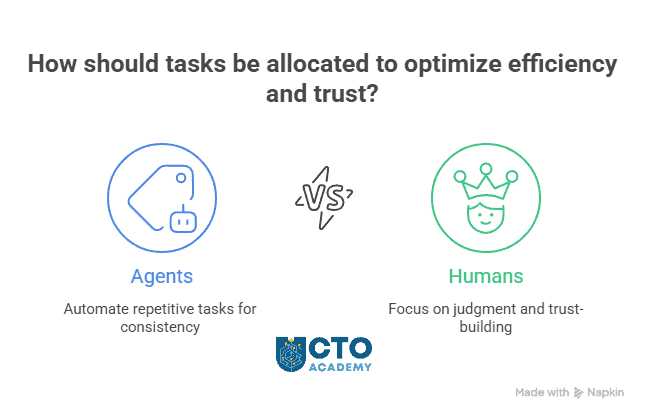
The fix is structural. High-performing teams organize around outcomes, not functions. They build cross-functional workstreams where agents and people co-own results: agents handle repeatable tasks; humans focus on judgment, exceptions, and trust.
Leaders who’ve made the shift describe the turning point plainly:
- “We didn’t need more AI features. We needed someone accountable for an AI-powered outcome.”
- “If the cost of being wrong is higher than being slow, we keep humans in the loop. If not, we scale.”
This playbook demonstrates how to transition from assistants to agents to automated workflows, with clear guardrails, roles, and KPIs that transform experiments into durable ROI. It draws from a CTO Academy’s Expert Q&A session with Karina Mendonça (CTO & Technology Strategist).
TL;DR
- Your AI stalls aren’t tooling gaps; they’re org design gaps.
- Organize around outcomes, not functions: small cross-functional pods where agents + humans co-own results.
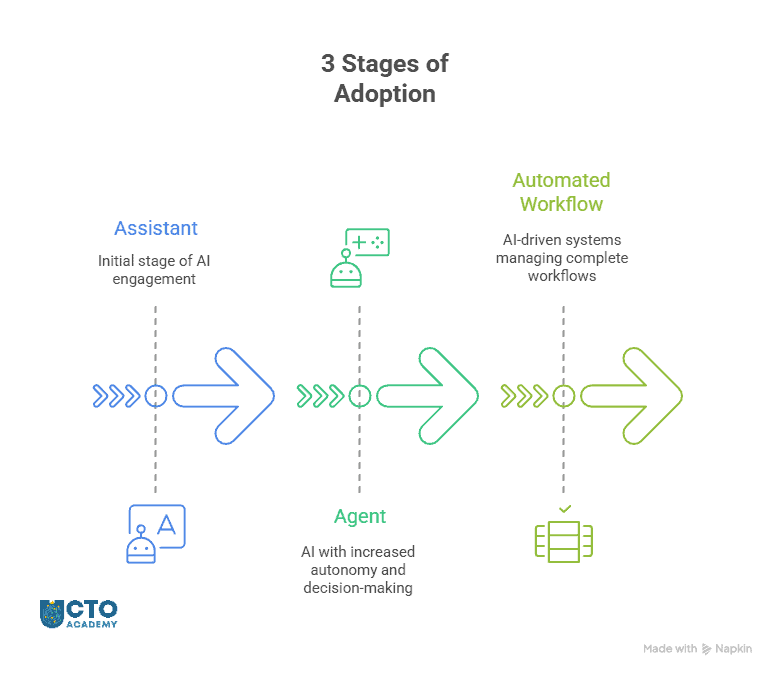
- Adopt in stages: assistant → agent → automated workflow, with clear exit criteria between each.
- Size the human–AI oversight ratio to the cost of being wrong; lower review as confidence stabilizes.
- Build guardrails into the flow (data policy, approvals, audit, rollback) so governance accelerates, not blocks.
- Run a 90-day plan per use case (shadow → limited live → scale) and fund only what moves a single KPI.
Table of Contents
Why AI Is an Org Design Problem
Shift From Functions to Outcomes
AI struggles in organizations that are built around functions rather than results.
In a function-first model, product, data, operations, and risk each optimize for their own backlog. AI value, however, shows up across those boundaries. In other words, it is at the intersection of data, workflows, and decisions. So when no one owns the end-to-end outcome, pilots stay trapped in prototypes and “assistant” demos, which, consequently, causes plateaus.
What’s going wrong (function-first):
The first issue is fragmented ownership. Each team solves a slice; no one is accountable for the outcome (e.g., time-to-refund, days-sales-outstanding, first-contact resolution).
The second one is long handoffs, or the situation where ideas and data move through queues, but latency and context are lost.
Then, there is this common practice of using the AI as a patch, not a redesign. Teams simply “drop a copilot” into one step (e.g., drafting replies) but leave the overall workflow, handoffs, and ownership unchanged. You get a small local speed-up, not an end-to-end improvement, so the business KPI barely moves.
And for the final nail in the coffin, unclear guardrails slow everything. Because data rules, approval paths, and escalation points aren’t defined up front, any cross-functional AI step triggers ad-hoc reviews and “wait for legal/security” loops. Work stalls not because AI is risky, but because responsibilities and rules are vague.
How to fix it (outcome-first pods):
- Establish a cross-functional workstream where a small pod (product, domain lead, data/ML, operations, risk) owns a measurable outcome.
- Split the lanes into agentic and human. As implied in the introduction, AI agents should handle repeatable tasks while humans handle judgment, exceptions, and trust.
- Set up clear interfaces with predefined inputs/outputs, decision rights, and escalation paths.
- Use live metrics with dashboards tracking the outcome KPIs, not just activity metrics.
The outcome:
- Siloed backlogs transform into a shared outcome roadmap
- Tool trials make room for process redesign and agent insertion points
- Ad hoc approvals turn into codified guardrails and checkpoints
- Vanity metrics become business KPIs (cycle time, CSAT, cash, risk)
Action steps:
- Pick one outcome (e.g., “reduce ticket resolution time by 40%”).
- Form a pod with a single accountable owner.
- Map the process by marking (separately):
- Agentable steps
- Human judgment steps.
- Define guardrails (data use, escalation, rollback) and a baseline KPI to beat.
Recommended reading: Top 7 Concerns of Tech Leaders Implementing Agentic AI
The Adoption Sequence: Moving Through Stages
Stage your bets, don’t boil the ocean
Jason Noble, CTO, CTO Academy
Most teams try to jump straight from demos to full automation and then simply stall. A safer, faster path is to sequence capability in three stages. Each stage expands what AI is allowed to do, while you tighten guardrails, observability, and KPIs.
Stage 1 – AI as Assistant
AI is here only to help a human complete a task faster—drafts, summaries, suggested actions—but never acts on its own.
Examples:
- Drafting customer replies or internal updates
- Summarizing tickets, incidents, or contracts
- Retrieving relevant knowledge (RAG) to support decisions
Supervision:
- Humans review every suggestion before sending or applying
- Shadow mode comparisons: “What would AI suggest vs. what did we do?”
Success metrics (examples):
- Time-to-first-draft ↓ 50–80%
- Average handle time ↓ 20–40%
- Knowledge search success rate ↑ (measured via click-through/use)
Action steps:
- Log prompts/outputs; set quality thresholds
- Define redlines (data scope, tone, legal/finance exclusions)
- Build a small, realistic evaluation set (happy path + edge cases)
Stage 2 – AI as Agent (digital colleague)
In the second stage, AI takes bounded actions inside a system (create a ticket, route a case, file a draft PR), with clear rules and rollback. Humans approve the tricky bits or review samples.
Examples:
- Auto-triage and routing (tickets, leads, exceptions)
- Structured updates (CRM hygiene, status changes, tagging)
- Suggested refunds/credits up to a safe limit, with approval on exceptions
Supervision:
- Confidence thresholds decide “auto-apply” vs. “send for review”
- Sample reviews (e.g., 10–20% spot checks) + automatic escalation on low confidence
- Killswitch + change log for every action
Success metrics (examples):
- First-contact resolution ↑
- Cycle time from intake → next step ↓ 40–60%
- Manual touches per item ↓
Requirements:
- Fine-grained permissions, audit trails, and observability
- Policy checks (PII handling, financial controls) baked into flows
- Error budgets and rollback procedures
Stage 3 – Automated Workflow
Multiple agents orchestrated across systems to complete a full process (e.g., verify → decide → execute → notify), with humans supervising only high-risk or novel cases.
Examples:
- Payment or collections workflows with bounded amounts and clear rules
- Knowledge-to-brief pipelines (aggregate feedback → draft brief → route for sign-off)
- Inventory/pricing updates with thresholds and anomaly detection
Supervision:
- Human review only at predefined quality gates (e.g., >€X, legal/finance edge cases)
- Continuous monitoring, alerts on drift or anomaly
- Post-implementation audits and monthly council reviews
Success metrics (examples):
- End-to-end cycle time ↓ 60–90%
- Cost-per-transaction ↓
- SLA/CSAT/DSO improvements tied to the workflow
Make it production-ready:
- Comprehensive eval harness (accuracy, fairness, robustness)
- Defense-in-depth: input validation, policy checks, anomaly detection
- Business continuity plans and periodic red-team tests
Quick Overview of Changes
| Stage | Typical candidates | Primary success metric | Risk level | Production-ready presets |
|---|---|---|---|---|
| Assistant | Drafts, summaries, retrieval | Time saved per task | Low | Logging, eval set, redlines |
| Agent | Triage, routing, small-bounds actions | Cycle-time & manual touches | Medium | Permissions, audit, error budgets |
| Automated workflow | Multi-step orchestration | End-to-end KPI (SLA/CSAT/DSO) | Higher | Full eval harness, anomaly detection, BCP |
Success Criteria
The point is to move up the stage only after the following conditions are satisfied:
- Assistant suggestions meet/exceed the agreed quality bar on your eval set
- Redlines, data policy, and audit logging are in place and verified
- Error rate is within the error budget for two consecutive sprints
- You can trace an output to inputs, prompts, versions, and approvals
- The KPI tied to this stage (e.g., cycle time, FCR, DSO) has moved materially
Basically, we are talking about these five conditions:
- Precision
- Safety
- Stability
- Observability
- Business proof
When these hold at one stage, move to the next with a limited-scope rollout (single market, segment, or product line) before broadening.
Done-for-You Design Pattern
As you scale, start in the shadow mode, letting the assistant or agent run silently for a sprint so you can compare its choices to human decisions without risk.
Slowly introduce confidence thresholds in the next step so low-confidence cases route to humans while high-confidence actions apply automatically.
At the same time, place guardrails at the edge—where harm could occur—by enforcing policy checks before money moves or sensitive data crosses boundaries.
Remember: Keep every action rollback-ready with a reversible path and clear ownership. Even after the successful implementation, continue sample reviews on a rotating schedule to catch drift, novel edge cases, and process regressions early.
Action Steps (checklist)
- Pick one assistant use case and define a baseline KPI (time saved, handle time).
- Build a 10-20 item eval set with real edge cases. Make sure to agree on the quality bar.
- Add logging + redlines. Run this in shadow mode for a sprint.
- If the bar is met, promote to Agent with confidence thresholds and a killswitch.
- Review results with a lightweight AI council and decide whether to scale or pause.
Recommended reading: Essential CTO Tools in 2025 for Bridging Vision and Operations
The question now is, how to find the right oversight balance?
The Optimal Human–AI Oversight Ratio
The right amount of human review isn’t a universal number. Instead, it’s a function of risk, impact, and novelty. In other words, too little oversight underuses AI or adds to tail risk. Too much, on the other hand, creates bottlenecks and wipes out the gains. Leaders should, therefore, size review to the cost of being wrong vs. the cost of being slow, and adjust as confidence improves.
Start with a simple rule: if an action can materially affect money, customers, compliance, or reputation, increase human involvement at that step. For lower-impact or well-understood tasks, reduce reviews as metrics stabilize.
Quick Sizing Sequence
When in doubt, use this sequence:
- Map the workflow and tag each step by risk/impact.
- Assign the minimum review that would make a skeptic comfortable.
- Run in shadow mode, then tighten thresholds until KPIs move without breaching the error budget.
- Reassess monthly; lower review where precision holds, raise where novelty or drift appears.
New Roles and Upskilling Best Practices
Human–AI collaboration changes who does the work and how it’s owned. The important thing to understand here is that you don’t create a new empire of “AI people,” but extend existing roles. Plus, you want to add a few targeted responsibilities so outcomes have clear owners.
The goal is simple: every AI-powered workflow has someone accountable for value, someone accountable for safety, and enough hands-on capability in the team to iterate without waiting on a central queue. This implies that you must consolidate existing roles.
Core Roles to Formalize
- AI Product Owner/Strategist:
- Prioritizes use cases by business KPI
- Writes one-pagers (purpose, guardrails, success metric)
- Runs the 90-day plan
- Aligns with legal/security
- AI Trainer/Policy & Prompt Engineer:
- Turns messy tasks into structured instructions
- Builds evaluation sets and encodes redlines
- Tunes prompts/tools for reliability
- Workflow Engineer (domain ICs upskilled):
- Designs the end-to-end flow
- Identifies “agentable” steps, wires systems/actions
- Owns rollbacks and observability
- Data & Risk Partner (fractional/embedded):
- Ensures data classification, retention, and approvals are applied in the flow
- Runs periodic audits and incident reviews
That said, we must also consider upskilling the non-technical staff because, whether we like it or not, they are pretty much involved in processes.
Baseline AI Literacy for Non-technical Staff
The best practice is to distribute a 4-module playbook:
- How agents work (tasks, tools, confidence, and escalation)
- Data & privacy in practice (what can/can’t be used; examples from your workflows)
- Prompt patterns + policy redlines (from intent via instruction to safe output)
- Quality & feedback (how to log issues, propose improvements, and read dashboards)
The Next Steps
- Nominate one AI Product Owner per priority workflow.
- Schedule the four literacy modules (≤60 minutes each) for the full pod.
- Create the capability matrix and fill gaps with targeted upskilling or fractional support.
- Tie role expectations to KPI movement (not activity), reviewed biweekly.
Governance Without Friction
The purpose of AI governance is not to put the red tape everywhere but to introduce certain guardrails.
In other words, governance should accelerate delivery, not block it. Therefore, treat it like a product: minimum viable controls, clear owners, and fast paths to “yes.”
Additional action steps:
- Publish simple rules that anyone can follow (what data can be used, where it can go, who approves exceptions, and how incidents are handled)
- Create a lightweight AI Council (security, legal, data, product) that meets weekly to unblock pilots and review metrics, not to re-litigate principles.
Design controls where harm could occur:
- Place policy checks at the edge (i.e., before money moves, contracts are sent, or sensitive data crosses boundaries)
- Bake guardrails into the workflow (permissions, rate limits, thresholds, logging) so teams don’t have to remember them.
- Default to transparency: every automated action should be traceable (inputs, prompts, versions, approvals) and reversible.
Copy-paste checklist (use per use case):
- Purpose & KPI defined (what business metric must move)
- Data policy applied (classification, retention, redaction)
- Human-in-the-loop points + escalation thresholds
- Evaluation suite (accuracy, bias, robustness, drift)
- Observability & audit (traceability, change log, alerts)
- Fallbacks & killswitch (who owns rollback, how to invoke)
Remember to keep the paperwork light: one-page briefs per workflow, monthly audits, and incident postmortems that improve the rules. When the rules are simple, visible, and embedded, adoption speeds up and risk stays controlled.
How to Avoid AI Solutionism
Start from pain, not possibility. That’s the POC that earns budget.
Igor K, CM, CTO Academy
The fastest way to waste time with AI is to start from capability (“we have a copilot”) instead of pain (“tickets linger 3 days; DSO is 58; onboarding slips two weeks”).
AI solutionism, the term derived from Morozov’s critique of the instinct to treat complex social or organizational problems as solvable by tech alone, is the reflex to start with a shiny capability (“let’s add a copilot!”) instead of a concrete operational problem and an end-to-end redesign. In practice, it’s having a support team deploy an email-drafting bot while leaving the real bottlenecks: slow routing, unclear refund thresholds, and legal approvals. Drafts do get faster, but tickets still wait in queues, so first-response time and CSAT don’t budge.
From a leadership perspective, AI solutionism signals missing ownership and weak framing: no single KPI to move, no guardrails, no rollback plan, and no one accountable for the outcome. The antidote is disciplined problem selection (start from the pain), explicit success metrics, a redesigned workflow that separates “agentable” steps from human judgment, and a time-boxed POC with error budgets and go/kill criteria. Tools must follow structure, not the other way around.
So begin by mining your backlog and metrics for choke points: long cycle times, handoffs, rework, compliance blocks, or cash trapped in process. Then redesign the workflow, don’t just drop AI into an old step. When you change the flow, ownership, and guardrails together, the KPI moves.
Anchor every experiment to a single business metric and a time-boxed plan. If the metric won’t budge in 30–45 days, change the design or kill it quickly.
POC design template (copy/paste):
- Problem & KPI: What hurts, and which number must move? (e.g., Cut first-response time from 18h → 4h.)
- New workflow (short): Steps, systems touched, agentable vs. human gates, and rollbacks.
- Guardrails: Data scope, approval thresholds, confidence floor, logging/observability.
- 30–45 day plan: Shadow week → limited live → review against baseline; go/hold/kill.
What to measure (pick 1–2 max):
- Cycle time/time to resolution
- First-contact resolution or deflection rate
- Working capital metrics (DSO/DPO)
- Cost-per-transaction or manual touches per item
- CSAT/NPS for affected journeys
Action steps:
- Choose one pain point with clear, frequent volume and bounded risk.
- Write the one-page POC using the template; agree on the KPI and error budget.
- Run shadow mode for a sprint, then move to limited live with a killswitch.
- Review in the AI Council (scale only if the KPI improves and guardrails hold).
Field-Tested Use Cases
Below are four proven workflows that deliver fast, measurable wins. Each pairs an agentable core with clear human checkpoints so risk stays controlled.
Use Case #1: Customer Triage & Routing (web/e-commerce/B2B support)
What it does: Classifies inbound messages, extracts intent and metadata (order ID, priority, sentiment), and routes to the right queue or macro; proposes actions like replacements or refunds within safe limits.
Where to start: A single channel (email or chat) with well-defined categories and macros.
What to track: First-response time, deflection rate, % auto-routed correctly, CSAT on assisted tickets.
Make it production-ready: Confidence thresholds for auto-route vs. human review; refund limits; audit log of each decision; weekly spot-checks.
Use Case #2: Payment Collections Automation (Order-to-Cash)
What it does: Sequences reminders, updates contact details, proposes payment plans, marks disputes, and closes the loop when remittance lands.
Where to start: One region or customer segment with consistent invoice terms.
Track: DSO, promise-to-pay conversion, agent touches per invoice, dispute cycle time.
Make it production-ready: Amount thresholds for human approval, integration with ERP for source-of-truth, and rollbacks for incorrect dunning.
Use Case #3: Insight Synthesis for CX/Marketing
What it does: Clusters feedback from tickets, reviews, and surveys; drafts weekly briefs with top themes, examples, and suggested experiments.
Where to start: One data source (e.g., support tickets) and a single product area.
Track: Time-to-insight, adoption of recommended experiments, downstream CSAT/NPS shifts.
Make it production-ready: Redaction of PII, reproducible prompts/tools, and a sign-off step by a product/cx lead before distribution.
Use Case #4: Knowledge-base Assistant for Operations
What it does: Answers “how do I…?” queries using approved SOPs; proposes next actions (forms, checklists), and pre-fills fields from context.
Where to start: A tightly scoped SOP set (onboarding, refunds, RMA) with up-to-date docs.
Track: Handle time, answer accuracy (sampled), % of cases resolved without escalation.
Make it production-ready: Document freshness checks, fallbacks to human SME on low confidence, and telemetry to flag missing/contradictory SOPs.
Final implementation tip: Ship one use case per pod, run a shadow week, then limited live with a killswitch. Expand the scope only when the KPI moves and your guardrails hold.
Budgeting the Real Costs: Compute, Production-hardening, and Mistakes
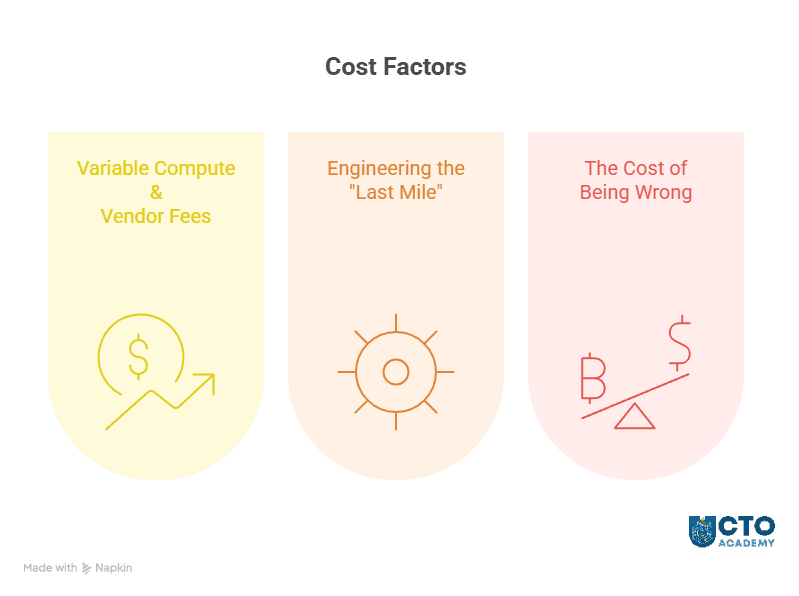
AI rarely blows the budget on model calls alone. The hidden costs live in production-hardening and error handling. Therefore, plan for three buckets:
- Variable compute and vendor fees
- Engineering the “last mile”
- The cost of being wrong
1) Variable compute & vendor fees
Expect usage to spike as adoption grows (more prompts, larger contexts, higher concurrency). Deploy these preventive actions:
- Right-size models, cap context windows, and cache aggressively
- Add guardrails that prevent runaway calls (rate limits, max-retries, token caps)
2) Engineering the “last mile”
Most of the spend lands here: integrations, eval harnesses, observability, permissions, audit trails, and rollbacks. Treat these as non-negotiable; they turn a demo into a durable service. So, budget time and money for test data, edge-case generation, and periodic red-team exercises.
3) The cost of being wrong
Model mistakes become operational costs: refunds, rework, compliance fixes, and reputational clean-up. Make this explicit with error budgets and approval thresholds—and stage rollouts (shadow → limited live → scale) to cap exposure.
If the cost of being wrong exceeds the cost of being slow, add humans to the loop.
Financial Hygiene Tips
- Track cost per unit of value (e.g., € per resolved ticket; € per € collected) rather than per token.
- Instrument per-workflow cost so pods see their own economics.
- Reserve a small “learning tax” line item for drift, retraining, and policy updates.
- Review monthly with finance and risk; pause scope where spend rises but KPIs don’t.
Refer to this guide for the list of FinOps & observability tools.
Implementation Roadmap (90-Day Plan)
A 90-day window is enough to prove value, harden guardrails, and decide whether to scale. Treat this like any other product rollout: write a one-pager, fix ownership, and commit to a single KPI per workflow.
Days 0–30: Frame, baseline, and shadow
Outcome: a clear problem statement, baseline metrics, and a no-risk trial.
- Pick one workflow with frequent volume and bounded risk (e.g., ticket triage or invoice reminders).
- Write a one-pager: purpose, KPI target, “agentable” steps vs. human gates, data scope, approval thresholds, rollback.
- Build a 10–20 item eval set with real edge cases; agree on the quality bar.
- Turn on shadow mode: the assistant/agent runs silently; compare its outputs to human decisions for a sprint.
- Stand up observability & audit (logs, prompts, versions, actions, owners) before enabling any actions.
Days 31–60: Limited live with tight guardrails
Outcome: controlled production impact with reversible actions.
- Enable bounded actions (e.g., auto-routing; refunds ≤ €X), using confidence thresholds to decide auto-apply vs. human review.
- Maintain sample reviews (10–20%), plus automatic escalation on low confidence or policy triggers.
- Enforce killswitch & rollback procedures; publish who can pause and how.
- Track the single KPI weekly (e.g., cycle time, FCR, DSO) alongside error budget and cost per unit of value.
- Hold a weekly AI Council to unblock issues quickly (data access, policy clarifications, tool limits).
Days 61–90: Scale or kill
Outcome: a decision based on evidence, not anecdotes.
- If the KPI moves materially and you’re inside the error budget, expand to a second segment (new region, channel, or product line).
- If not, stop or redesign: revisit the workflow, guardrails, or candidate use case.
- Where scaling: tighten evaluation harnesses (accuracy, fairness, robustness), add anomaly detection, and schedule monthly audits.
- Document the playbook (setup, thresholds, metrics, rollback) so the next pod can copy it without re-learning.
“What Good Looks Like” (examples)
- Customer triage: Time-to-first-response ↓ 60–80%, manual touches per ticket ↓ 30–50%, CSAT +8–12 pts.
- Collections: DSO ↓ 10–20%, promise-to-pay conversions ↑, touches per invoice ↓ 30–40%.
- Insight synthesis: Weekly brief time ↓ from 6h → 1h, adoption of recommended experiments ≥ 50%.
Quick Checklist
- One KPI that matters, with a documented baseline
- Confidence thresholds, review gates, and error budget defined
- Shadow → limited live → scale stages, each with exit criteria
- Observability, audit, and rollback in place before actions
- Owner named for value, and owner named for safety
- Weekly AI Council decisions recorded; monthly audit & drift review
End each 90-day cycle with a one-page results summary: baseline vs. current, cost per unit of value, incidents/learners, and a go/hold/kill decision. Then either templatize for the next pod or archive and move on.
For community examples and ready-made playbooks, join the CTO Academy Membership for peer feedback loops and playbooks.
Conclusion & Key Takeaways
Durable AI impact isn’t a tooling story but an org design story. Teams that win reorganize around outcomes, stage adoption from assistants → agents → automated workflows, and embed guardrails, roles, and KPIs so progress compounds safely.
The path is practical: pick a high-friction workflow, run a time-boxed POC, size the human–AI oversight ratio to the cost of being wrong, and scale only when the metric moves. The playbook is repeatable and yours to run.
Key Takeaways
- Start from pain, not possibility
- Organize for outcomes
- Adopt in stages (deliberately)
- Size the oversight ratio to risk
- Make it production-ready
- Governance without friction
- Measure cost per unit of value
- Scale or stop in 90 days
Next Steps
- Explore the Digital MBA for Technology Leaders for exec-level operating model design.
- Subscribe to the Technology Leadership Newsletter for ongoing case studies, templates, and peer-tested patterns.
Frequently Asked Questions
Do we need a separate “AI team,” or should we embed AI into existing teams?
Embed. Create small, cross-functional pods that own a single outcome (e.g., DSO, first-response time). Give each pod two explicit owners: one for value (KPI) and one for safety (guardrails). Use a lightweight central “AI Council” only to set policy, unblock access, and review metrics.
How do we pick the first AI use case?
Start from pain + volume + bounded risk. Choose a workflow with frequent cases and a clear KPI (cycle time, CSAT, DSO). Avoid rare, high-stakes tasks for the first win. Write a one-pager (purpose, KPI, agentable vs. human gates, guardrails, rollback) before you touch tools.
What does “human–AI oversight ratio” actually look like in practice?
Use confidence thresholds and quality gates. Auto-apply above the bar; route below to humans. Add spot checks (10–20%) and a killswitch. Increase review where the cost of being wrong is high (money moves, legal exposure); decrease it as precision stabilizes.
We tried copilots and saw little impact. What likely went wrong?
Classic AI solutionism: you patched a step without redesigning the flow or ownership. Fix by mapping the end-to-end process, inserting agents where they remove handoffs, defining guardrails, and tying the change to one KPI. Run shadow → limited live → scale with clear exit criteria.
How do we budget for AI beyond model costs?
Expect most cost in production-hardening: integrations, eval sets, observability, permissions/audit, and rollback paths. Track cost per unit of value (e.g., € per resolved ticket) and keep a small “learning tax” for drift, re-work, and policy updates.
What skills do non-technical staff need?
A short baseline: (1) how agents work (tasks, tools, escalation), (2) practical data/privacy rules, (3) prompt patterns + policy redlines, and (4) quality & feedback (how to log issues, read dashboards, and request rollbacks). Upskill domain ICs into workflow engineers who can design, monitor, and iterate safely.