In late 2021, Zillow shut down “Zillow Offers,” its algorithm-driven home-flipping arm, after the company admitted it could no longer trust its pricing model to predict near-term home values. The fallout was brutal: more than half a billion dollars in losses, plans to offload roughly 7,000 homes, and layoffs affecting about a quarter of the workforce. Executives cited a lack of confidence in the algorithm’s ability to anticipate market movements at the required speed, validating warnings researchers had raised about the operational risks of iBuying models.
But the truth is, Zillow didn’t fail because “AI doesn’t work.” It failed because a complex feature (algorithmic pricing, rapid acquisitions, and renovation logistics) outpaced the organization’s readiness across data quality, operational capacity, risk controls, and decision-making guardrails. In other words, the capability was deployed before the system—encompassing people, processes, data, and oversight—was ready to support it.
This article offers a practical “AI Feature Readiness Check” so technology leaders can avoid Zillow-style surprises. We’ll frame the challenge, expand the flowchart into a concrete checklist, and provide takeaway actions you can use in your next roadmap review.
TL;DR
- AI is a capability, not a feature. Treat it as a cross-functional system—data, compliance, UX, operations, and economics—not just a model pick.
- Start with a falsifiable outcome. If you can’t state the user behavior change and the metric target, you’re not ready to build.
- Gate your work through eight checks: problem framing → data fitness → privacy/legal → model selection against SLOs → UX guardrails → human-in-the-loop → observability (quality/safety/drift/cost) → decision: scale, iterate, or sunset.
- Choose the simplest thing that works. Prefer heuristics or smaller models if they meet accuracy, latency, and cost envelopes.
- Design for trust. Add input/output policies, safe fallbacks, and a kill switch before any broad rollout.
- Instrument economics. Track cost per successful outcome alongside quality; treat cost regressions like incidents.
- Action plan (2 weeks): one-pager problem statement → 50–100 real samples → lightweight DPIA & DPAs → model bake-off vs. SLOs → guardrails + HITL + dashboards → limited alpha → evidence-based go/iterate/sunset.
Table of Contents
Why AI Features Fail?
Most “let’s add AI” conversations start with excitement and end with rework. Contrary to what some believe, the root problem isn’t the model but the organizational readiness gap. You see, integrating an AI capability touches every layer of the system: data, compliance, user experience, operations, finance, and change management. Miss one, and the whole feature under-delivers or creates new risks.
The list of challenges is long, as the following infographic clearly shows:
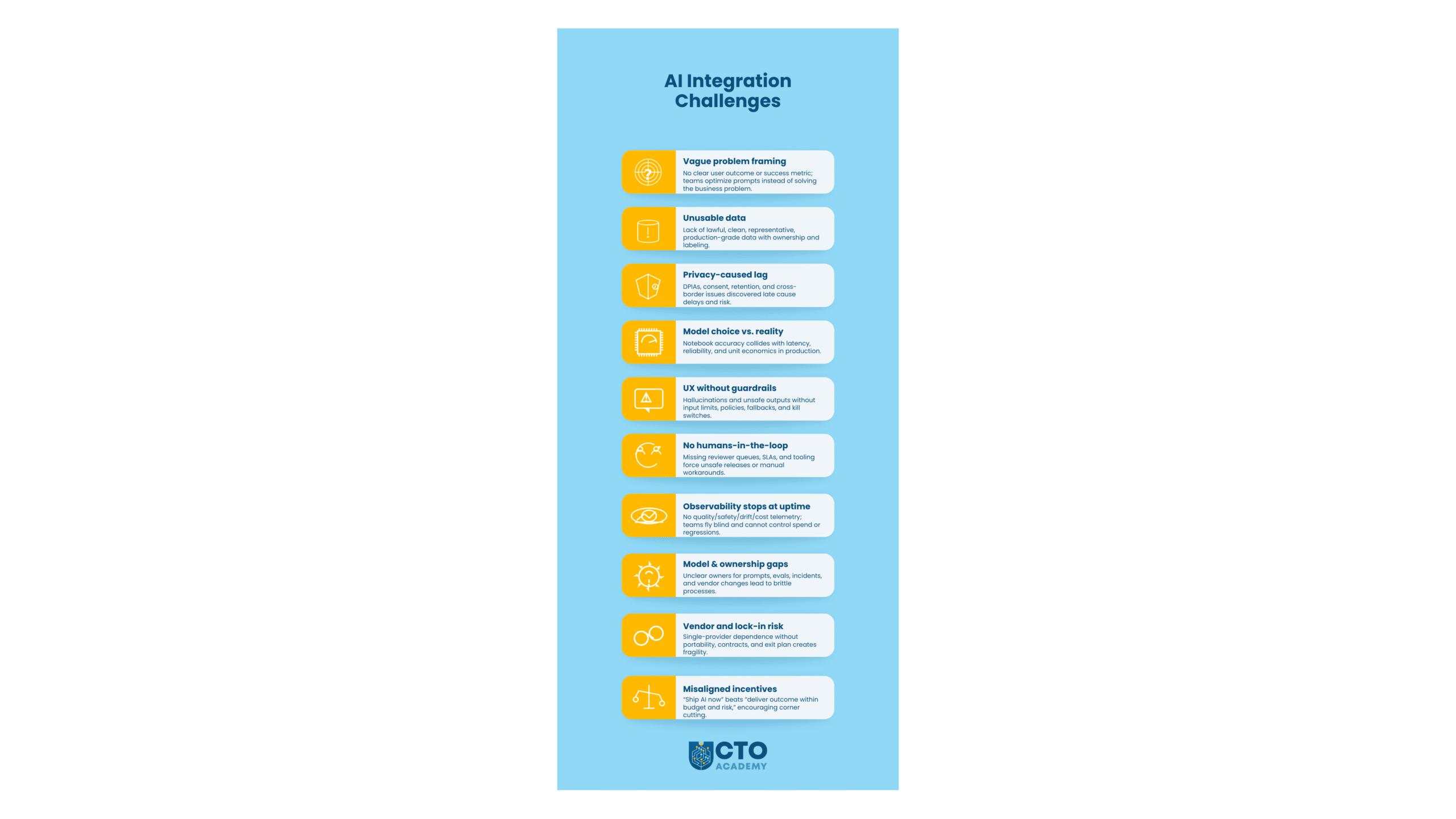
10 Most Common Challenges
Ch. 1: Vague problem framing that leads to unfalsifiable success
Teams jump to “add GPT so users can X” without a crisp outcome and metric. If you can’t name the user’s job-to-be-done and the measurable lift (e.g., reduce resolution time by 20%), you’ll optimize prompts instead of solving a business problem. This makes trade-offs impossible and invites scope creep.
Ch. 2: Data that’s available, but not usable
AI needs lawful, representative, production-grade data. Common gaps include:
- Unclear ownership
- Missing consent/retention tags
- PII mingled with logs
- Offline training data that doesn’t match production distributions.
Even when data exists, labeling quality and freshness often aren’t good enough for reliable outcomes.
Ch. 3: Compliance and privacy lag the prototype
As a rule of thumb, early demos completely skip DPIAs, cross-border transfers, vendor DPAs, and retention policies. And once legal steps in, teams discover that model inputs include sensitive categories or that outputs can’t be audited.
The usual quick fix?
Retro-fitting.
Well, it might sound like a good idea, but such an action causes delays with compliance, launch, and, worse, creates trust issues with customers.
Ch. 4: Model choice collides with reality
A model that’s accurate in a notebook may be too slow, costly, or brittle under real traffic. Leaders must therefore balance accuracy vs. latency vs. cost vs. operational complexity (fine-tuning, eval suites, red-teaming). Without explicit thresholds, you get endless bake-offs and no decision.
Ch. 5: UX without guardrails
AI shifts failure modes from “doesn’t load” to “confidently wrong.” Without guardrails—input limits, policy enforcement, refusal behaviors, safe fallbacks, and kill switches—hallucinations become support tickets, and users lose trust fast.
Ch. 6: Humans-in-the-loop are an afterthought
Many AI actions, particularly on the agentic service level, require human review at defined risk thresholds (e.g., credit impact, legal messaging, bulk changes). If you don’t design queues, SLAs, and reviewer tooling, the feature either ships unsafe or stalls behind manual workarounds.
Ch. 7: Observability that stops at uptime
Traditional monitoring isn’t enough. You need quality (task-specific evals), safety (policy violations), drift (data/model changes), and unit economics (cost per successful outcome). Without this process, teams keep shipping tweaks with no learning loop or cost control.
Ch. 8: Operating model and ownership gaps
Who owns prompts, evals, model upgrades, incident response, and vendor changes?
Platform vs. product responsibilities are often unclear, leading to “shadow AI” and brittle knowledge silos. Without documented owners and runbooks, incidents take longer and regressions repeat.
Ch. 9: Vendor and lock-in risk
Relying on a single model/provider without portability (contracts, abstractions, test suites) makes cost spikes or policy changes existential. Leaders need an exit plan that includes compatible APIs, data export options, and budget scenarios.
Ch. 10: Misaligned incentives and messaging
Executives want momentum, but teams need guardrails.
If success is framed as “launch AI this quarter,” teams cut corners. If, on the other hand, success is a “measurable outcome within budget and risk,” teams can say “not yet” with evidence.
The bottom line is that AI features fail when organizations treat them as isolated model choices instead of cross-functional capabilities. The readiness check exists to collapse this complexity into a sequenced, testable path to value.
Recommended tutorial: Tech Leaders Guide to AI Integration: Reconciling Innovation, Infrastructure, and Security
The AI Feature Readiness Flow
Gate 1: Problem framing
Goal: Anchor the work on a real user/job outcome and a falsifiable success metric.
Check:
- Whose problem is this (persona, context)?
- What behavior will change and by how much (e.g., “reduce median ticket resolution from 14h → 9h”)?
- What’s the counterfactual—what would we ship if we didn’t use AI?
Evidence: One-page problem statement with target metric, baseline, and time horizon; short list of non-AI alternatives.
Go/No-Go: No-Go if you cannot state the measurable effect and an acceptable range (e.g., “≥20% lift within 60 days”).
Anti-pattern: “We’ll figure the KPI after we prototype.”
Gate 2: Data availability & quality
Goal: Confirm that lawful, representative, production-grade data exists (or can be created) to support the outcome.
Check:
- Data source map: ownership, consent, retention, residency.
- Fitness: coverage, freshness, label quality, edge cases, adversarial examples.
- Access: stable interfaces, schema evolution plan, and observability on inputs.
Evidence: Data sheet (provenance, risks), sample set with labels (if supervised), and a documented plan for ongoing labeling/feedback.
Go/No-Go: No-Go if critical data is missing, unlawful to process, or cannot be refreshed at the cadence the feature needs.
Anti-pattern: Training on exported/offline data that doesn’t match production distribution.
Gate 3: Privacy & legal
Goal: Design compliance into the solution, not as a retrofit.
Check:
- DPIA (or equivalent) completed for sensitive use; data minimization applied.
- Cross-border transfers, vendor DPAs, subprocessors, retention & deletion flows.
- User controls: consent, opt-out, and audit trail.
Evidence: Signed DPA (if using vendors), DPIA summary, records of processing, and a red/blue-team review for misuse scenarios.
Go/No-Go: No-Go if the path to compliance is unclear or depends on “we’ll do it after launch.”
Anti-pattern: Sending PII to third-party models without a documented legal basis and audit.
Gate 4: Model selection
Goal: Choose the simplest approach that meets the outcome within latency and cost targets.
Check:
- Candidate approaches (heuristics, retrieval, small/medium/large models, fine-tune vs. prompt-programming).
- Non-functional limits: p95 latency, reliability, cost per successful task, throughput.
- Evaluation protocol: task-specific metrics and test sets (golden paths + nasty edge cases).
Evidence: Bake-off table with measured accuracy and unit economics; decision memo stating trade-offs.
Go/No-Go: No-Go if the only viable model violates latency/cost SLOs or requires infra your team can’t run.
Anti-pattern: Picking the highest-accuracy model in a notebook and discovering it’s 5× too slow/expensive in prod.
Gate 5: UX guardrails
Goal: Prevent harmful or low-trust experiences and make failure a safe experience.
Check:
- Input filtering (PII, prompts with risky intent), rate limits, and size caps.
- Output policies (toxicity, PII leakage, claims with citations, refusal behaviors).
- Fallbacks (retrieve-then-generate, templates, human escalation), and a big, obvious kill switch.
Evidence: Guardrail spec, policy tests, and screenshots of fallback flows.
Go/No-Go: No-Go if a plausible failure can harm users or produce unsupported claims without a safe fallback.
Anti-pattern: “We’ll add moderation later if support sees tickets.”
Gate 6: Human-in-the-loop (HITL)
Goal: Insert humans at well-defined risk thresholds—without turning the feature into manual labor.
Check:
- Which actions require review/approval? What are the SLAs? Who are the reviewers?
- Tooling for reviewers: queues, diffs, suggested edits, hotkeys, and feedback capture.
- Learning loop: how reviewer decisions improve prompts, retrieval, or models.
Evidence: HITL swimlane diagram, reviewer playbook, and capacity plan.
Go/No-Go: No-Go if you cannot staff and instrument the review layer for the expected volume.
Anti-pattern: Email threads as the “review system.”
Gate 7: Observability
Goal: See quality, safety, drift, and cost in real time—beyond uptime.
Check:
- Quality: task-level evals, win-rate, exact/semantic match, human rating distributions.
- Safety: policy violation rates, refusal correctness, and privacy incidents.
- Drift: input distribution shift, retrieval freshness, model/embedding changes.
- Economics: cost per successful outcome, per-request cost caps, budget alerts.
Evidence: Dashboards (or notebooks) with example traces; alert rules tied to SLOs; runbooks for incident classes.
Go/No-Go: No-Go if you can’t answer “What did the model do for user X at 10:32?” with a trace and policy audit.
Anti-pattern: Only monitoring 200/500s and average latency.
Gate 8: Decision – sunset or scale
Goal: Make the outcome-based call without bias toward sunk cost.
Check:
- Did we hit the target metric within the cost/latency envelope?
- Is the experience safe and trusted (complaint/violation rates within thresholds)?
- Is the ops model sustainable (on-call load, reviewer backlog, vendor risk)?
Evidence: Trial report (before/after), cost & risk summary, and a scale plan (traffic ramp, caching, fine-tune/prompt strategy).
Decision:
- Scale if the outcome is met and unit economics hold at projected volume.
- Iterate if you’re close, with a bounded plan (≤1–2 sprints) and a clear blocker to remove.
- Sunset if metrics or economics miss, and no small fix changes the trajectory.
Anti-pattern: “We promised it in Q3, so ship it.”
Practical artifacts
- One-pager problem statement (Gate 1).
- Data sheet (sources, governance, risks).
- Compliance pack (DPIA, DPA, retention map).
- Model bake-off table (accuracy vs. latency vs. cost).
- Guardrail test suite (input/output policies + fallbacks).
- HITL playbook (roles, SLAs, tooling).
- Observability dashboard (quality, safety, drift, cost).
- Trial report (go/scale/sunset recommendation).
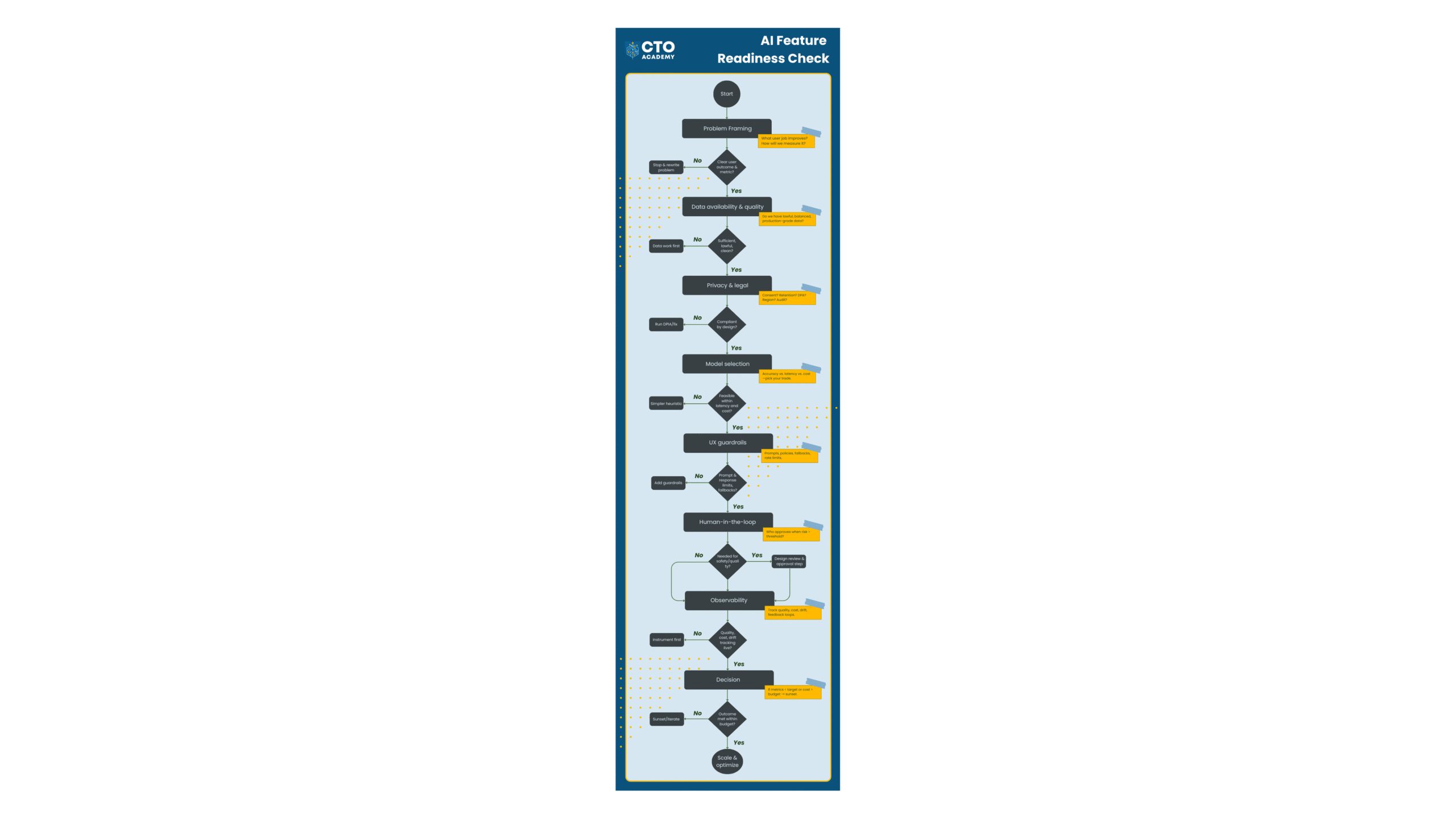
Treat each gate as a yes/no test. If a gate fails, do the smallest piece of work that unlocks the next decision—not another unbounded prototype.
Here’s the visual flowchart of the process:
Key Takeaways
- AI is a capability, not a feature. Don’t treat it as just another model choice. Instead, treat it as a cross-functional system spanning data, compliance, UX, ops, and economics.
- Start with an outcome you can falsify. If you can’t name the user behavior change and the metric target (e.g., “≥20% improvement in X by date Y”), you’re not ready.
- Data fitness beats data abundance. Ensure that data is lawful, representative, production-grade, data—owned, refreshed, and properly labeled. That matters more than volume.
- Design compliance from day one. DPIA/consent/retention and vendor DPAs must be part of the blueprint, not a retrofit.
- Pick the simplest model that meets SLOs. Evaluate accuracy, latency, and cost per successful outcome; avoid “notebook winners” that fail in prod.
- Make failure safe for users. Guardrails (input filtering, output policies, fallbacks, kill switch) are product requirements, not nice-to-haves.
- Humans in the right loop. Define review thresholds, queues, SLAs, and feedback capture so HITL improves the system rather than blocking it.
- Observe what matters. Instrument quality, safety, drift, and unit economics; be able to trace “what the model did” for any request.
- Decide with evidence, not sunk cost. Scale if outcomes + economics hold; iterate with a bounded plan if close; sunset if they don’t.
- Ship in gates, not big bangs. Use the eight-step readiness flow as a repeatable, stop-anytime decision process for every AI idea.
Action Steps
If you’ve read this far, you already know why “just add AI” fails. The win comes from turning the readiness flow into muscle memory. Here’s a tight, actionable 2-week plan you can start today:
Day 1–2: Pick one candidate use case
Choose a single, high-signal workflow (support, onboarding, analytics insight, etc.). Write a one-page problem statement:
- Persona
- Desired behavior change
- Baseline
- Target (e.g., “reduce median resolution time 14h → 9h in 60 days”)
- The non-AI alternative
Day 3–4: Validate data fitness.
Map sources, owners, consent/retention, and freshness. Pull a 50–100 sample that reflects reality (edge cases included). If you can’t, your first deliverable is a data remediation task, not a prototype.
Day 5: Compliance first, not last.
Spin up a lightweight DPIA (or equivalent), confirm vendor DPAs, and document what data will not leave your boundary. If this is fuzzy, pause.
Check this simple infographic to understand the difference between DPIA and DPA.
Day 6–7: Evaluate models against SLOs.
Run a small bake-off (heuristic vs. small/medium LLM) with task-specific evals. Track accuracy, p95 latency, and cost per successful outcome.
Week 2: Design for trust.
- Add UX guardrails (input/output policies, safe fallbacks, a kill switch) and a minimal HITL queue with clear SLAs.
- Stand up observability for quality, safety, drift, and unit economics.
- Ship to a limited alpha.
Friday of Week 2: Decide with evidence.
Review the alpha report: Did we hit the target within cost/latency envelopes?
- Scale with a traffic ramp plan, or
- Iterate with a ≤2-sprint fix, or
- Sunset and move to the next use case.
Transform this into an AI feature deployment policy. Create a standing “AI Readiness” gate in your product lifecycle. Every new AI idea enters through the same eight checks. Because, in the long run, it’s the habit that delivers value, not the hype.
FAQ – Frequently Asked Questions
How do I know if an AI approach is better than a simple heuristic or rules?
Run a quick bake-off on realistic samples. Compare task success, p95 latency, and cost per successful outcome. If a heuristic hits the target metric within your SLOs (and is cheaper/more stable), choose it. AI should earn its keep.
How much data do we actually need to start?
Enough to cover real distribution + edge cases for a small alpha (often 50–500 labeled examples per task is plenty to decide). If you can’t assemble a lawful, representative sample quickly, your first milestone is data remediation, not modeling.
What’s the minimum viable compliance for prototypes?
Document purpose & legal basis, run a lightweight DPIA if there’s any sensitive data, and ensure a DPA with vendors before sending data. Enforce data minimization (redact/avoid PII) and keep an audit trail of what leaves your boundary.
How do we measure “quality” beyond accuracy?
Use a small eval suite tied to user outcomes: pass/fail on critical cases, semantic match or win-rate for subjective tasks, and safety metrics (policy violations/refusal correctness). Track these alongside latency and unit economics in one dashboard.
How do we keep costs from exploding as usage grows?
Set a cost-per-success ceiling and enforce it with per-request caps, caching, RAG (retrieve before generate), and a model tiering strategy (cheap default, expensive fallback). Review cost drivers weekly; treat regressions like incidents.
When should humans be in the loop, and how do we avoid bottlenecks?
Insert review at defined risk thresholds (financial impact, legal/comms exposure, bulk actions). Give reviewers proper tools (queues, diffs, canned feedback) and SLAs. Crucially, capture reviewer decisions to improve prompts/retrieval/models so the loop shrinks over time.